What Role Can a Mobile Robot Play in Visitor Reception?
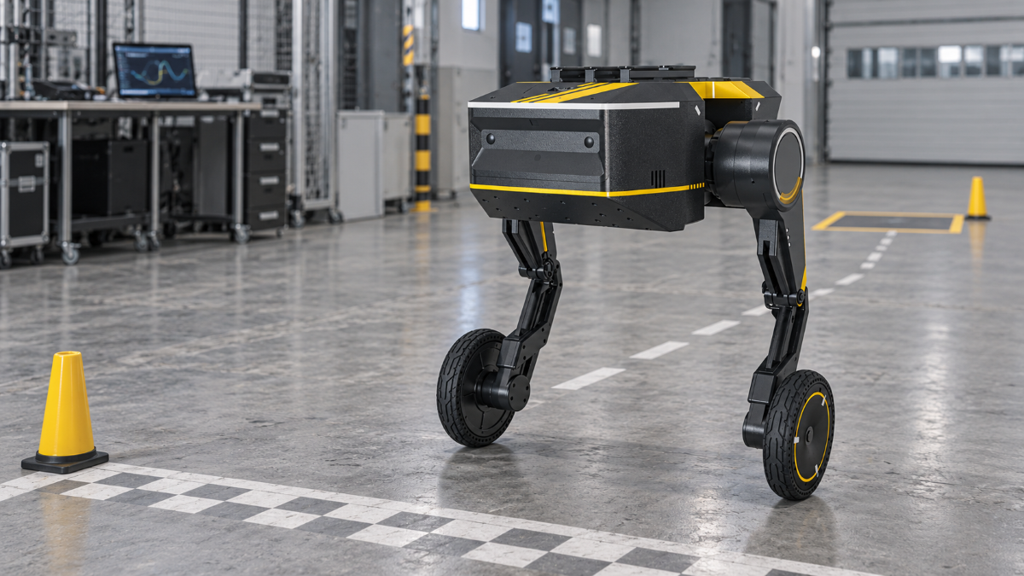
If you are weighing a reception robot for a showroom or lab, the real question is what it will do during a visit and who stays in charge of it. TITA, the 8-DoF wheeled bipedal robot we build, fits that picture as a mobile platform for staff-supported reception. TITA supports a staff-led reception workflow rather than an autonomous, end-to-end front desk.
Four capabilities carry the visit: moving between agreed points, sending a live robot-side view to an operator, playing audio through two built-in speakers, and responding to an assigned operator's controls. A practical way to assess that setup is to follow one visit from arrival to handoff, then work backward through venue fit, configuration and rehearsal.
How an Operator-Led Visit Works, Step by Step
Consider a proposed scenario: a client group is booked for 10:00 at a robotics showroom. An operator drives TITA, a host leads the conversation, and a salesperson or engineer receives the group at the final stop. TITA does not replace them; it carries the camera viewpoint and speaker output between agreed displays rather than keeping the interaction at one fixed point. Off-site viewing must be confirmed separately because the documented browser workflow uses TITA’s local IP address. The setup suits planned, uncrowded tours where mobility adds value, not unattended check-in, autonomous guidance or routes beyond the operator’s line of sight.
Meet Visitors at a Designated Welcome Point
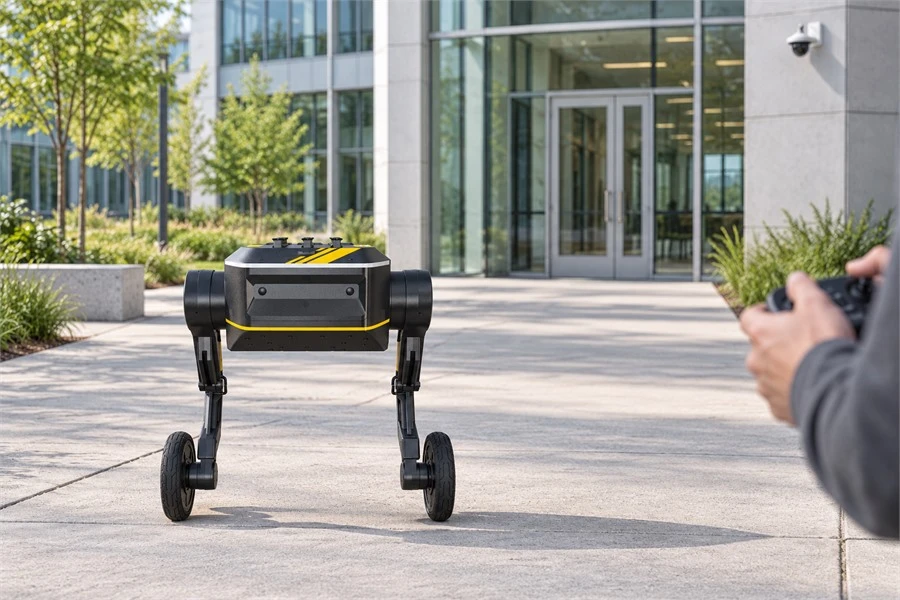
Before the group arrives, TITA stands at a marked spot in an open part of the entrance area. The operator sits nearby with the controller and a screen displaying the robot's live camera feed, which shows the welcome point from the robot's own position.
A spoken greeting can be added to this moment once the project team has set up and tested the speaker-control path. The current image-transmission package does not support audio customization, so the greeting is planned as its own part of the setup. When the guests walk in, the host leads the conversation, from introductions and badges to questions and any change to the agenda.
Move Between Agreed Interaction Points
The route has three stops planned ahead of time: the welcome point, a product display and a demo bay. The operator drives TITA from stop to stop at low speed, and the robot stops before each interaction begins.
That mobile viewpoint is useful only when each stop is chosen deliberately. Position TITA so the camera can cover both the group and the exhibit before the interaction begins. When autonomous navigation is not running, the TITA user manual requires line-of-sight control, so the operator must either walk with the group or remain in a position that keeps TITA visible throughout the route.
Complete the Visit and Hand Over to Staff
At the last stop, a salesperson or engineer greets the guests by name and the host passes the visit over. The operator then brings the robot back to the welcome point, or parks it clear of the walkway, ready for the next booking.
What Each Capability Contributes to the Visit
The walk-through combines five building blocks documented across TITA’s specification, product page, development resources and user manual. The final column shows how those platform capabilities would be used in this proposed reception workflow; it does not describe a standard, preconfigured reception package.
| Capability | Documented basis | Proposed role in this reception workflow |
|---|---|---|
| Mobile platform | 8-DoF wheeled bipedal structure | Moves between preselected visitor stops under direct operator control |
| Remote visual feedback | 2 built-in cameras, Remote Image Transmission | Provides a live robot-side view that supplements direct visual supervision |
| Speaker output | 2 built-in speakers, Remote Speaker | Delivers short, preplanned greetings, directions and handoff cues |
| Operator control | Supplied controller; Phone Control listed as optional | Supports an operator-led control plan with defined handovers |
| Integration support | ROS 2, SDK/API access, and TITA Bridge expansion | Provides documented interfaces for project-specific hardware and software integration |
Two details shape how these pieces work in a real room. Standing, TITA measures 510 × 590 × 490 mm, so its built-in cameras see the space from well below an adult's eye line. Stops can be placed to give the operator a clear look at faces and exhibits. Where a higher view matters, a compatible additional camera can be evaluated, along with its mounting, power, data interface and software support.
On the viewing side, the documented setup opens a browser page and connects through the robot's local IP address once the image-transmission package is installed, as the TITA development manual describes. Select and validate the receiving device and browser during deployment.
Where a Staff-Supported Reception Robot Fits

This setup suits venues where visits are booked in advance and the reception area is uncrowded enough for slow, deliberate driving.
Venues That Match the Workflow
Corporate showrooms with scheduled client visits
Robotics labs and R&D centers hosting partners or students
Technology demonstration facilities, where the robot is part of what guests came to see
Low-traffic office reception pilots with a short, fixed route
The closest real-world reference comes from a filming deployment. At the 2026 Blue Dragon Series Awards in Incheon, TITA was used as a mobile camera platform alongside handheld and fixed crews across the arrival route, photo zone and media interview area. Although this was not a reception project, it demonstrates a comparable operating pattern: a planned route, fixed stopping points and staff-supervised movement.
Site Conditions That Shape the Setup
Treat wireless conditions as a go/no-go check. The user manual prohibits use where communication signals are poor, electromagnetic interference is strong or many wireless devices are operating, and lists Wi-Fi hotspots, routers and Bluetooth devices as possible interference sources. Rule out sites that conflict with those conditions before testing the actual controller and image link. A short route check can reveal obvious dead zones but cannot establish long-term stability; unresolved interference should be discussed with us.
For live video, the operator needs a usable view at each stop under the venue’s normal lighting. The manual’s requirement for more than 200 lux and its warning to avoid direct sunlight apply only if the camera measurement function is used; they are not general image-transmission requirements. The route must remain open and uncrowded, making a booked visit, a host on hand and a clear walking path a stronger starting point than a packed exhibition hall or busy public lobby.
How to Configure Interaction and Control for Your Site
Once the venue passes that screen, decide who retains control, what the operator must see, what visitors need to hear and which requirements justify custom integration.
Choose the Control Method
A dedicated controller is included in the TITA product package, and one detail matters during long demos: the controller switches itself off after 10 minutes without input, which can easily happen while a host talks through an exhibit. Agreeing ahead of time who holds the controls at each stop, and who takes over if the operator steps away, keeps handovers smooth.
Phone Control is optional. The official Android TITA-app documents USB, Bluetooth and virtual joystick control; remote use of the virtual or USB joystick requires VIP authorization. Confirm phone-based control as an optional requirement before ordering.
Plan the Visual Workflow
The live feed supplements direct observation. When autonomous navigation is not in use, the manual requires TITA to be controlled within line of sight, so the operator must keep the robot visible throughout the route. A side desk is suitable only if it preserves that view; a back-office screen may provide an additional view for another staff member, not the default driving position.
Plan What Visitors Hear
Greetings, directions and short spoken cues fit the two built-in speakers and the Remote Speaker function. Keep each message short, then test it at the intended stop against the showroom's normal background noise.
Plan Add-On Hardware
A touchscreen, visitor registration, host notification, conversational AI, microphone input or an access-control link would require project-specific integration; none is a standard reception function. TITA Bridge, documented SDK/API access and the adjustable 48 V 5 A output provide integration starting points, not plug-and-play compatibility with every third-party system. Review mounting, total power draw, data interfaces and software for each proposal, keeping the complete moving payload within the published 10 kg limit.
Rehearse the Full Visit Before Guests Arrive
A full rehearsal on the actual route, with colleagues acting as visitors, can expose route, control, audio and handoff issues. Keep the area controlled and stop if direct line of sight is lost, the control or image link becomes unstable, the route cannot remain clear or the robot does not respond as expected.
Route clearance and every planned stop
Controller response and whether stopping clearance is adequate at the speed planned for the visit
Control-link and image-stream stability throughout the route
The usefulness of each camera view with visitors in their expected positions
Speaker clarity over normal room noise at each audio stop
The host’s handover at the final stop
The agreed stop, isolation and escalation procedure for a communication fault or unexpected response
Battery status and, if the schedule depends on it, the battery-swap procedure between visits
Withdrawal from the reception area, including TITA’s automatic crouch when powered off
Set pass criteria for the actual route, planned operating period and promised interaction. Approve the workflow only after line of sight, link stability, visitor separation and staff handoffs have been demonstrated under those conditions.
Frequently Asked Questions
Can visitors talk back to a remote host through the robot?
Real-time image transmission sends the robot-side view to the operator, and the speakers carry audio out into the room. TITA provides Remote Image Transmission and Remote Speaker, but its published specification does not include a built-in microphone or standard two-way audio. Treat return audio as a project-specific integration requirement.
Can the robot guide visitors on its own?
The setup described here keeps every move with the operator. Auto Following appears as an optional item in the specification, and automated route guidance is scoped as project-specific work.
Match the Robot Configuration to the Visit
A viable TITA reception project begins with an operator-visible route, site conditions that meet the manual and a bounded interaction plan. Send us the venue layout, proposed route, expected visitor flow, preferred control method and any third-party systems under consideration. We can then separate standard TITA capabilities from the project-specific integration the visit requires. Start the conversation here.